Turn “How-To” into “How-To-Buy” using Shoppable Stories
Sip of Inspiration
Your audience loves practical content like recipes or DIY projects, but the journey from watching a "how-to" video to gathering items is often fragmented.
With Storyly, you can close that gap by making your instructional content instantly shoppable, turning practical guidance into a completed project. The key is to use shoppable stories to create a one-tap shopping experience. Storyly allows you to tag products directly in your content, so as an item is shown, a user can tap to add it to their cart. This removes the friction of searching for individual items and makes starting a new project effortless.
For a grocery or recipe app, you can create a "30-Minute Meals" story series where each ingredient the chef uses can be tagged and added to the user’s shopping cart. This transforms recipe discovery into dinner planning in a single, seamless flow 🥘
Similarly, a home improvement app can feature DIY project tutorials 🧑🔧
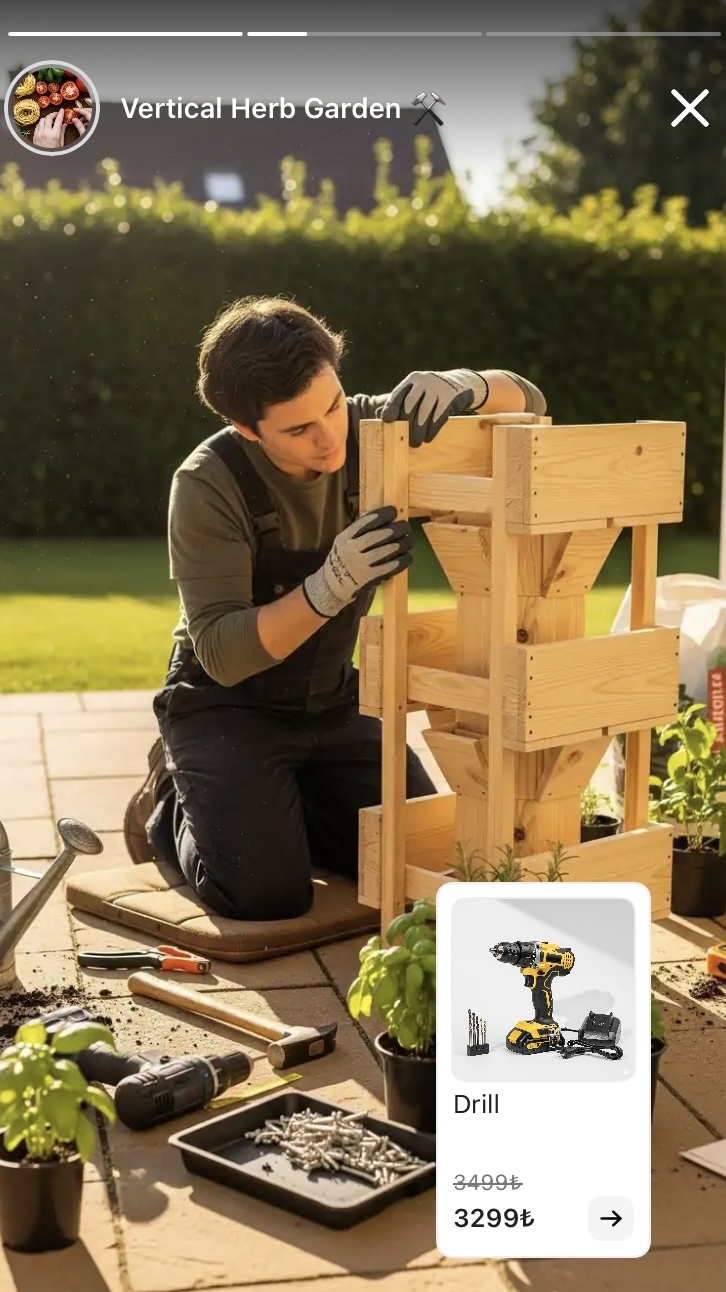
A story on building a "Vertical Herb Garden" can have shoppable tags on every tool and material, empowering users to purchase everything they need the moment they feel inspired to do the project 🌱
You can check out examples of Storyly in action.




Our playbook has more details
_2.png)
_3.png)